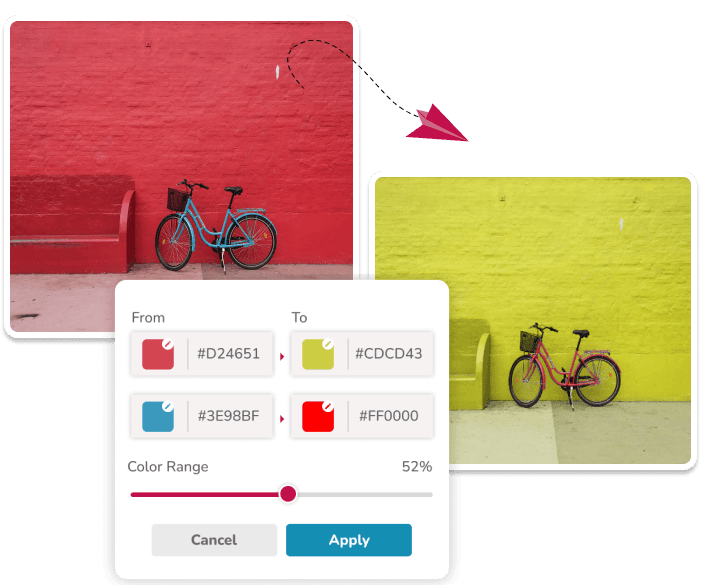
Replace Colors in a JPG or JPEG
Upload one JPG or JPEG image, enter the color you want to change and the new color, then adjust tolerance before downloading the result. This workflow is useful for simple photos, flat graphics, and quick visual experiments.
The editor processes matching hues across the full image. It does not select an object, so the same source hue in a background, reflection, or detail can also change. Check the preview before using the result.
How JPG Color Replacement Works
JPG files do not contain transparency. The browser reads the image, changes matching pixels on a canvas, and creates the edited download as a PNG. The original JPG file is not replaced.
JPEG compression can create closely related shades around edges and in gradients. Start with a narrow tolerance and increase it gradually if some of the intended color remains.
- Use a clean, well-lit source photo when possible.
- Choose a source hue that does not appear in unrelated parts of the photo.
- Inspect shadows, reflections, and compressed edges after processing.
- The downloaded result is a PNG, even when the uploaded file is a JPG or JPEG.
When a Different Editor Is Better
Use a masking editor when only one object should change, especially if its color also appears elsewhere in the photo. Use a color-managed workflow for print production, product manufacturing, or other work that needs measured color accuracy.
Questions About This Workflow
Can I change the color of a JPG online?
Yes. Upload one JPG or JPEG, choose source and target colors, and adjust tolerance. The browser changes matching hues across the image and provides a PNG download.
Does the tool download a JPG after editing?
No. JPG and JPEG files are accepted as input, but the current editor downloads the processed image as PNG.
Why did other parts of my JPEG change too?
The editor matches similar hues across the whole image rather than isolating an object. Lower tolerance or use an object-masking editor when the same color appears in unrelated areas.
Related Workflows
Use the image color changer for the broad replacement workflow.