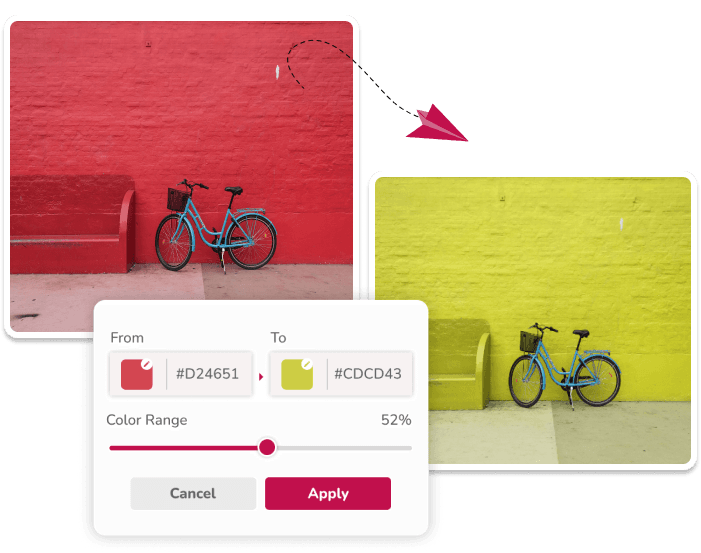
What an Online Image Color Editor Can Do
Image Color Changer is a browser-based image color editor for replacing matching hues in one PNG, JPG, or JPEG at a time. Choose a source color, enter a target color, adjust tolerance, and review the preview before downloading a PNG.
It works best when the original color is distinct from the rest of the image. For example, changing a blue icon on a white background is generally easier than changing a blue shirt in a scene with blue sky and reflections.
Edit Image Colors Step by Step
Start by choosing an image. In the editor, enter the HEX color you want to replace and the target HEX color. Use a small tolerance first, then raise it only if nearby shades need to be included.
After applying the change, inspect edges, text, shadows, and other parts of the image that contain a similar hue. You can add replacement pairs for simple multi-color edits.
- Upload one PNG, JPG, or JPEG image.
- Set source and target color references.
- Adjust tolerance and check matching areas.
- Download the edited image as PNG.
Know the Limits Before Editing
This editor changes matching pixels globally; it does not identify objects or create masks. Similar colors elsewhere in the image may change too. Gradients, JPEG compression, fabric texture, highlights, and reflections can require extra review.
Use an object-masking editor for isolated object changes and a color-managed workflow where exact output is required for print or manufacturing.
Questions About This Workflow
Is this image color editor free to use?
The editor can be used in the browser to process one PNG, JPG, or JPEG image at a time without creating an account.
Can I edit more than one color in an image?
Yes. Add a replacement pair for each simple color change, then inspect the preview because matching hues elsewhere can also be affected.
Does the editor keep PNG transparency?
Existing PNG transparency is retained. The current editor downloads processed images as PNG.
Related Workflows
Use the image color changer for the broad replacement workflow.